Skip to content

Eighteen Kardin reports you can open right now

Every one is a real export from a sample property. Filter by who runs it or when in the year it gets used, then open the PDF.

18 reports
Every one a real export you can open, print, or hand to a colleague
3 roles
Property managers, portfolio managers, and multi-family teams
4 seasons
Budget season, monthly close, year-end reconciliation, leasing
Who runs it
When

18 reports shown.

Property Managers

Budget, leasing, and recovery reports for a single property.

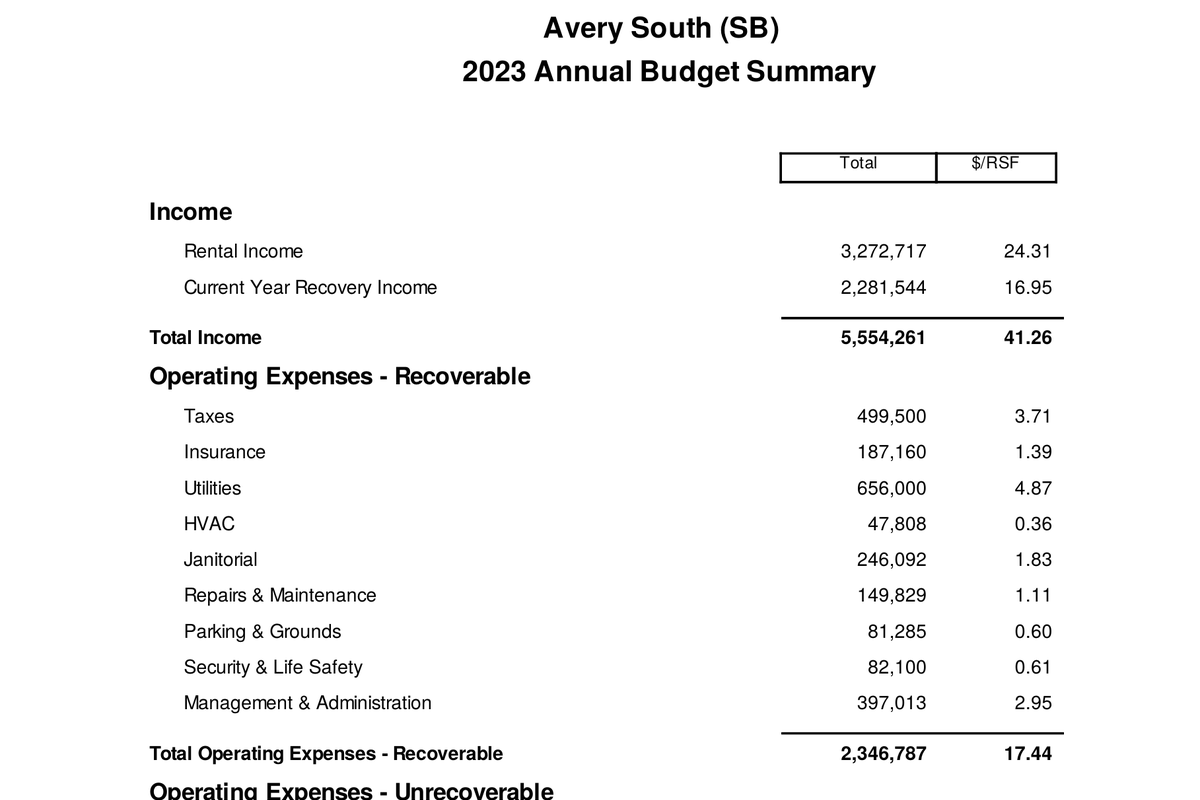
Annual Budget Summary for a sample office building: income, recoverable and non-recoverable operating expenses, and net operating income, each with a total and a per-square-foot figure.
First page of the sample, cropped. Open the PDF for the whole report.

Annual Budget Summary

Property ManagersBudget season
When you run it
Budget season, once the rent roll, expenses, and recoveries are in. The page that goes to ownership.
What it answers
What the year totals to, by account category, with a per-square-foot column so two buildings can be compared on one line.
Open the sample of Annual Budget Summary(PDF, 2 pages)
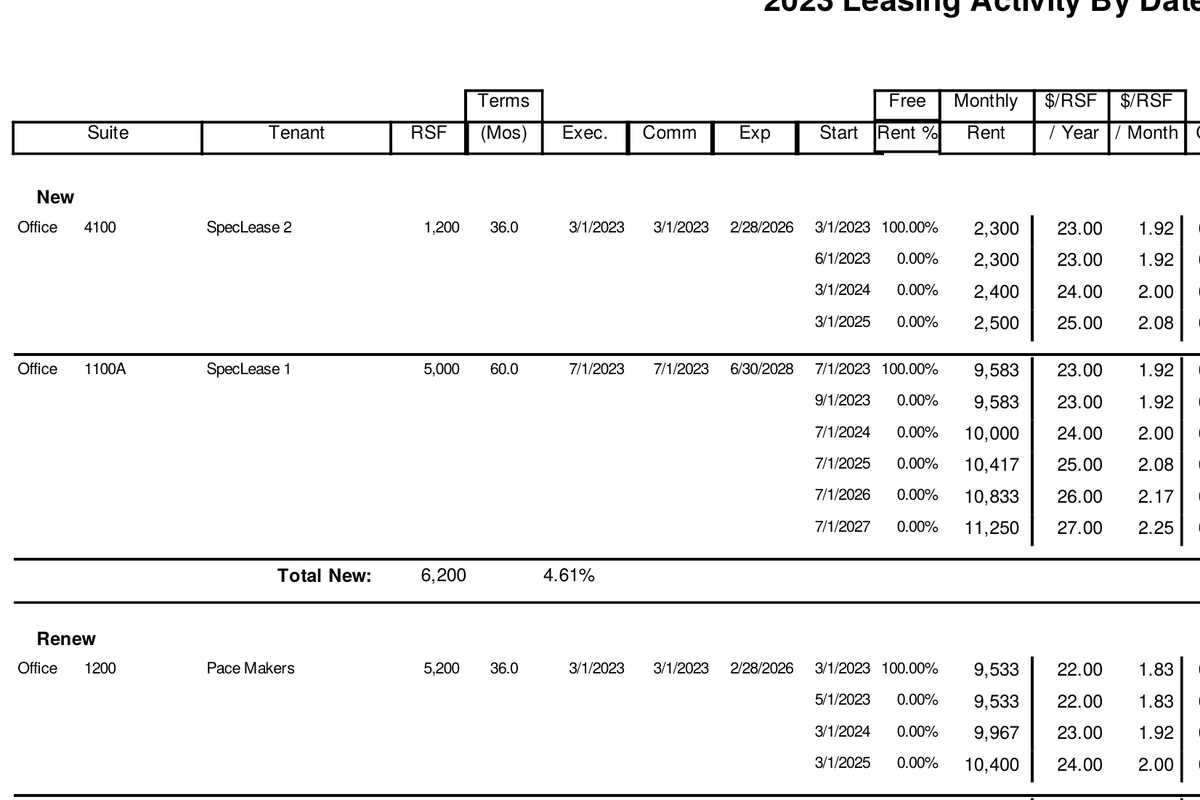
Leasing Activity by Date: new and renewal leases listed by commencement date with suite, tenant, square feet, term, and monthly rent.
First page of the sample, cropped. Open the PDF for the whole report.

Leasing Activity by Date

Property ManagersLeasingBudget season
When you run it
Budget season and any time the leasing assumptions change.
What it answers
Which leases start, renew, or expire during the budget year, in date order, with the rent and term behind each assumption.
Open the sample of Leasing Activity by Date(PDF, 2 pages)
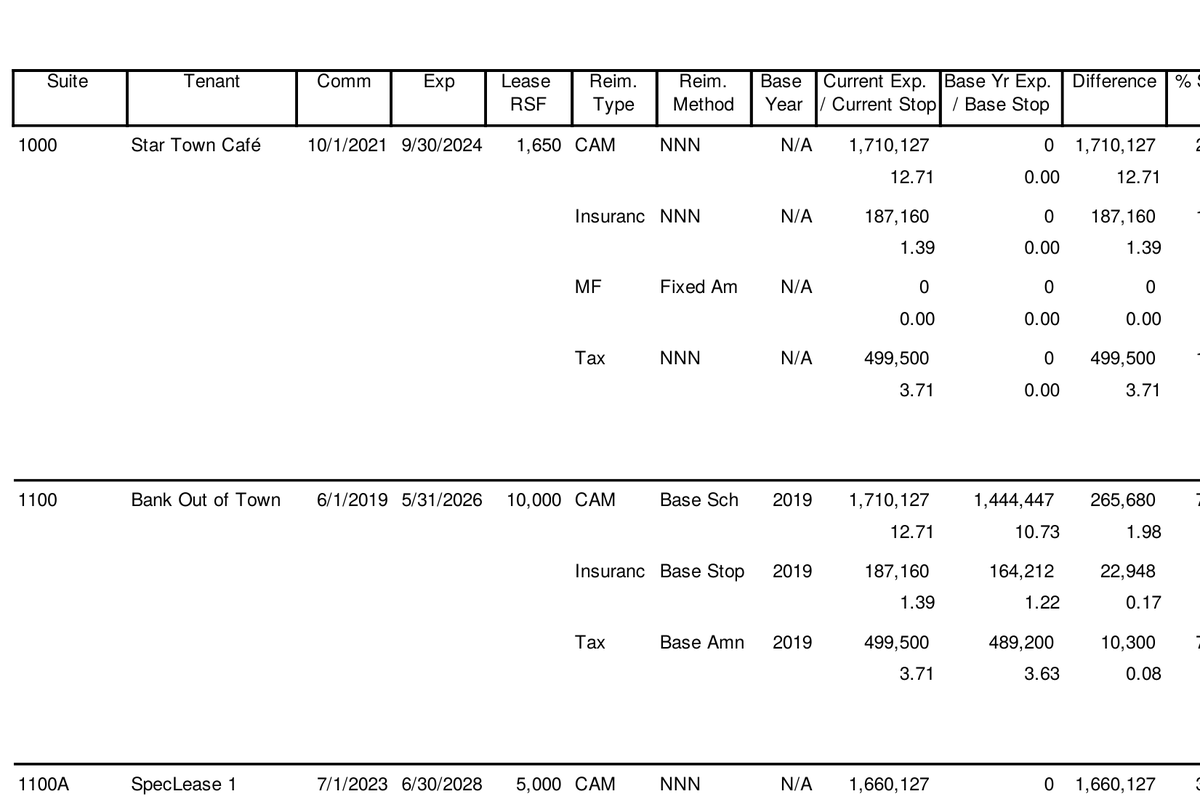
Recoveries Calculation by tenant: pro-rata share, base year stop, current year expense, and the resulting CAM, tax, and insurance recoveries.
First page of the sample, cropped. Open the PDF for the whole report.

Recoveries Calculation

Property ManagersBudget seasonYear-end and reconciliation
When you run it
Budget season for the estimates, and again at year-end for the reconciliation.
What it answers
What each tenant will be billed for CAM, tax, insurance, and utilities, and how the pro-rata share, base year, and caps got there. The first stop when a recovery number looks wrong.
Open the sample of Recoveries Calculation(PDF, 6 pages)
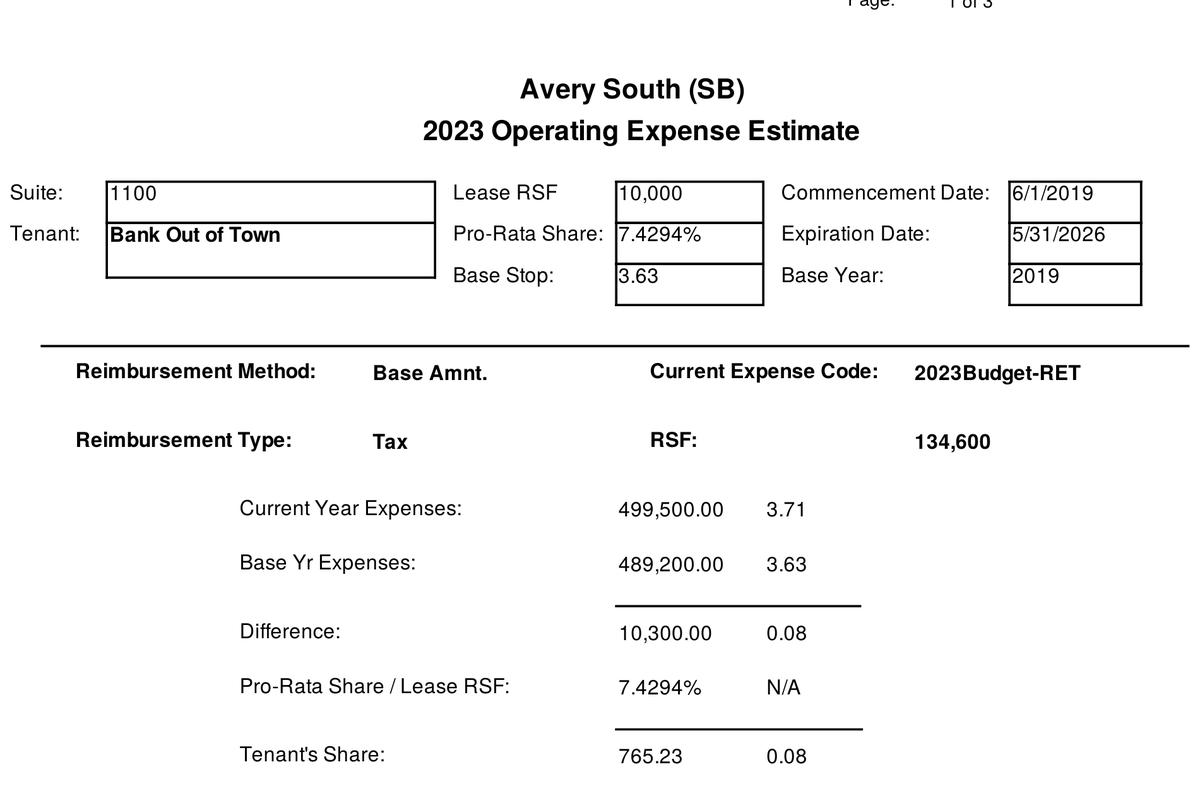
Tenant statement for one suite: lease square feet, pro-rata share, base year, current year expenses, difference, and the tenant’s monthly reimbursement.
First page of the sample, cropped. Open the PDF for the whole report.

Tenant Statement Combined

Property ManagersYear-end and reconciliationBudget season
When you run it
When estimate letters go out in the fall and when reconciliation statements go out in Q1.
What it answers
One statement per tenant, with the recovery math shown, ready to send. Sales tax and notes are options on the statement.
Open the sample of Tenant Statement Combined(PDF, 3 pages)
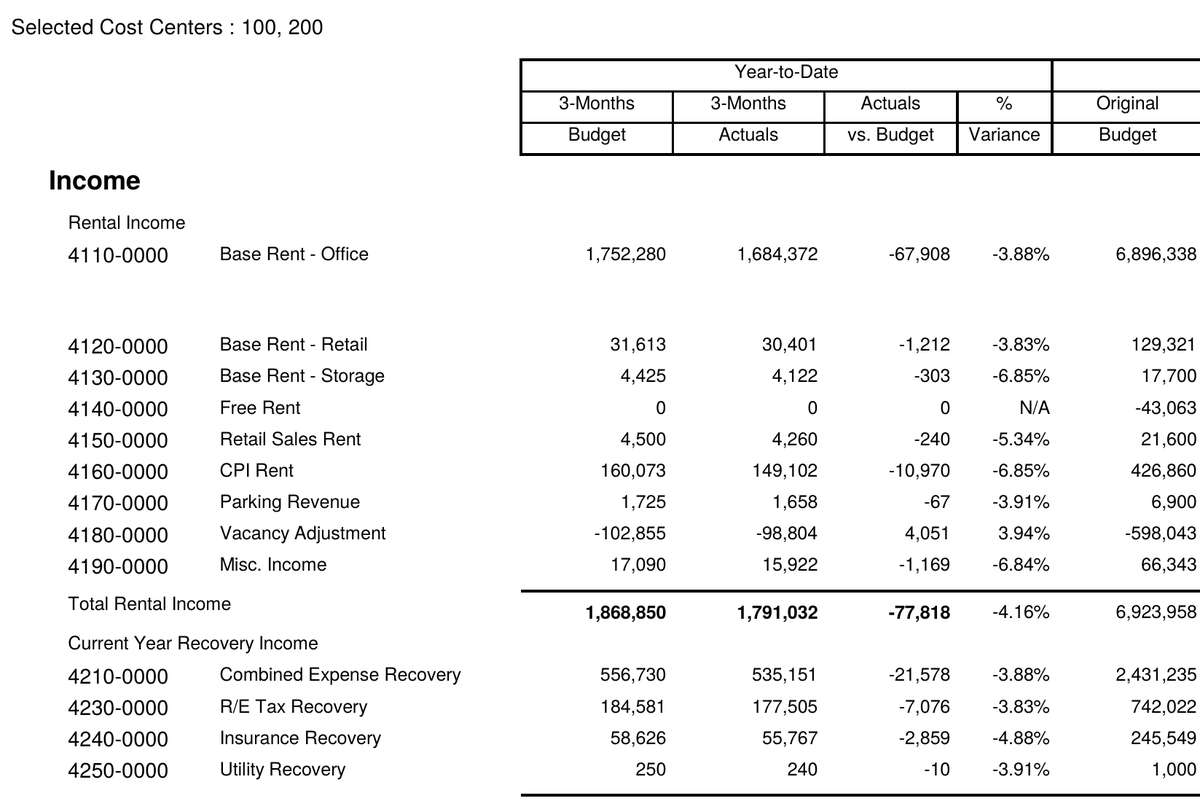
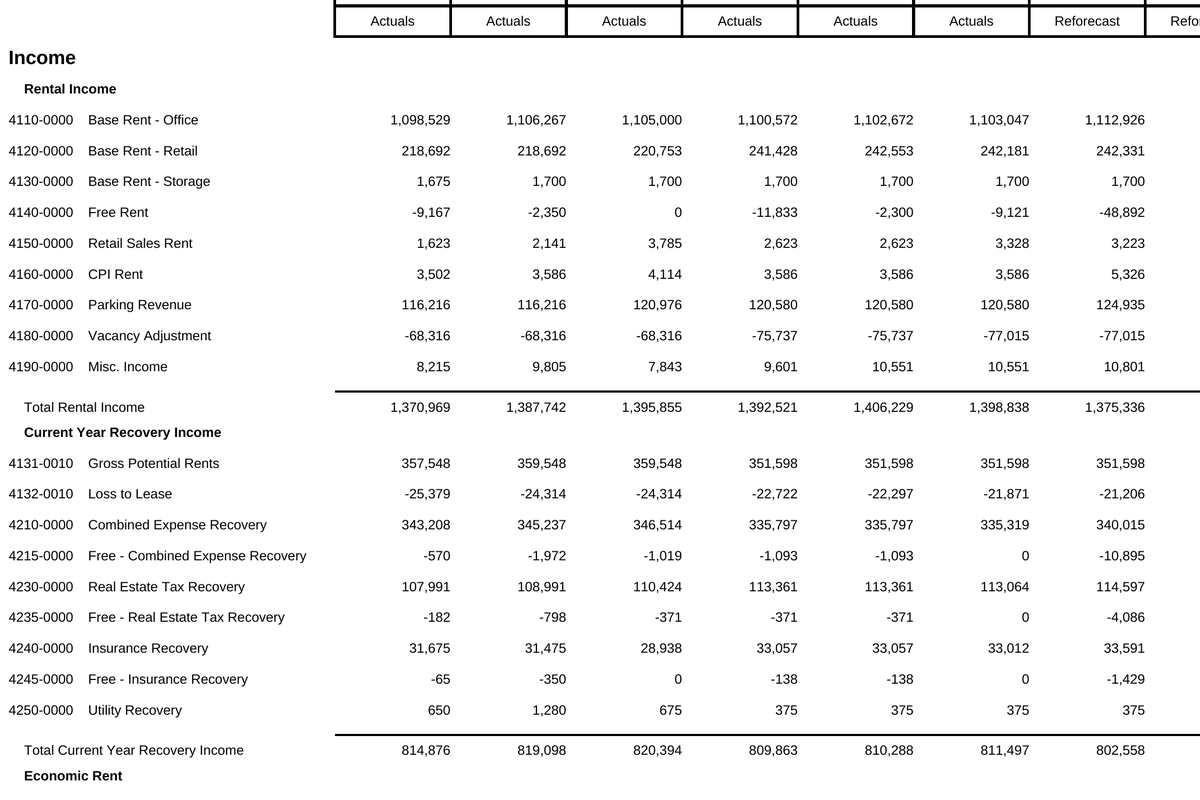
Combined Variance Detail: income and expense accounts with year-to-date budget, actuals, variance and percent, beside the original and reforecast annual figures and explanations.
First page of the sample, cropped. Open the PDF for the whole report.

Combined Variance Detail

Property ManagersPortfolio ManagersMonthlyYear-end and reconciliation
When you run it
Monthly after close, and whenever a reforecast is reviewed against the original budget.
What it answers
Year-to-date and twelve-month variance at the account level, original budget against actuals or reforecast, with the explanation column filled in.
Open the sample of Combined Variance Detail(PDF, 5 pages)
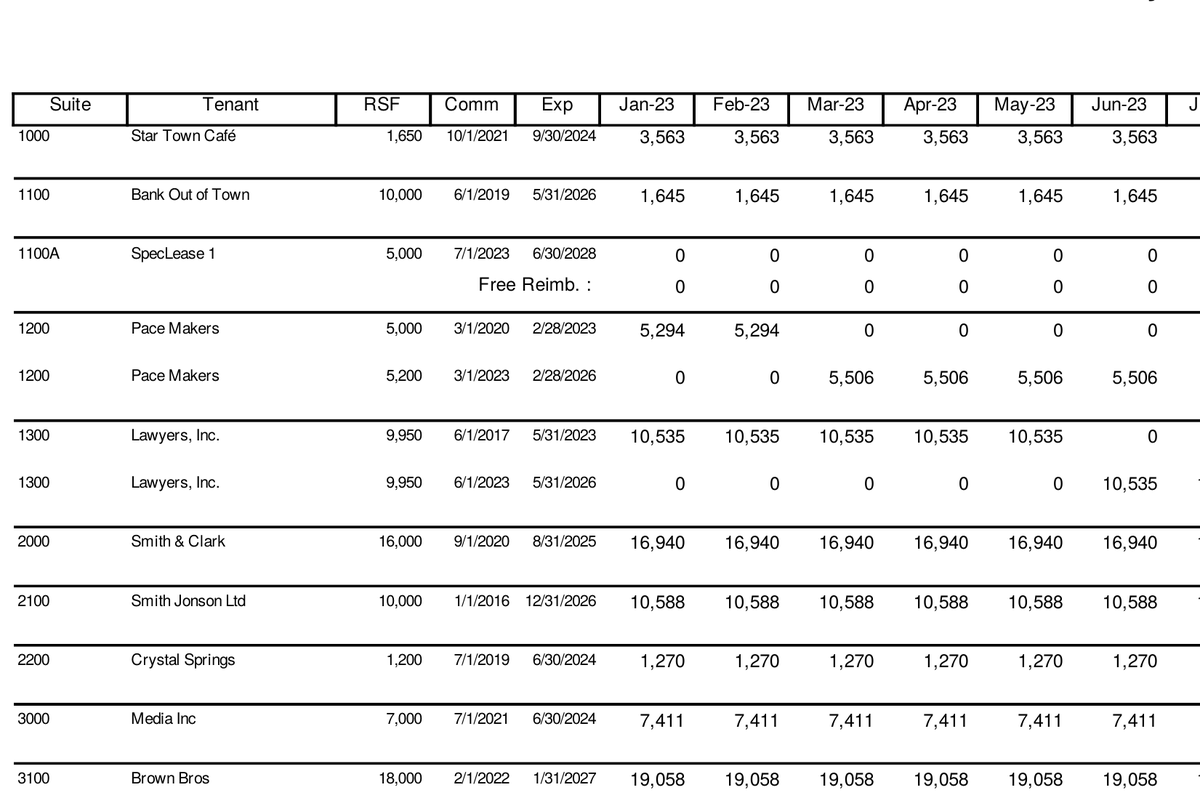
Tenant CAM Recovery Schedule: one row per tenant and suite with the monthly CAM charge across twelve months and the annual total.
First page of the sample, cropped. Open the PDF for the whole report.

Tenant CAM Recoveries Schedule

Property ManagersMonthlyBudget season
When you run it
Budget season to set the monthly billing, then monthly to check what was billed against it.
What it answers
The CAM charge for every tenant in every month of the year, on one grid, so the billing schedule and the budget agree.
Open the sample of Tenant CAM Recoveries Schedule(PDF, 7 pages)
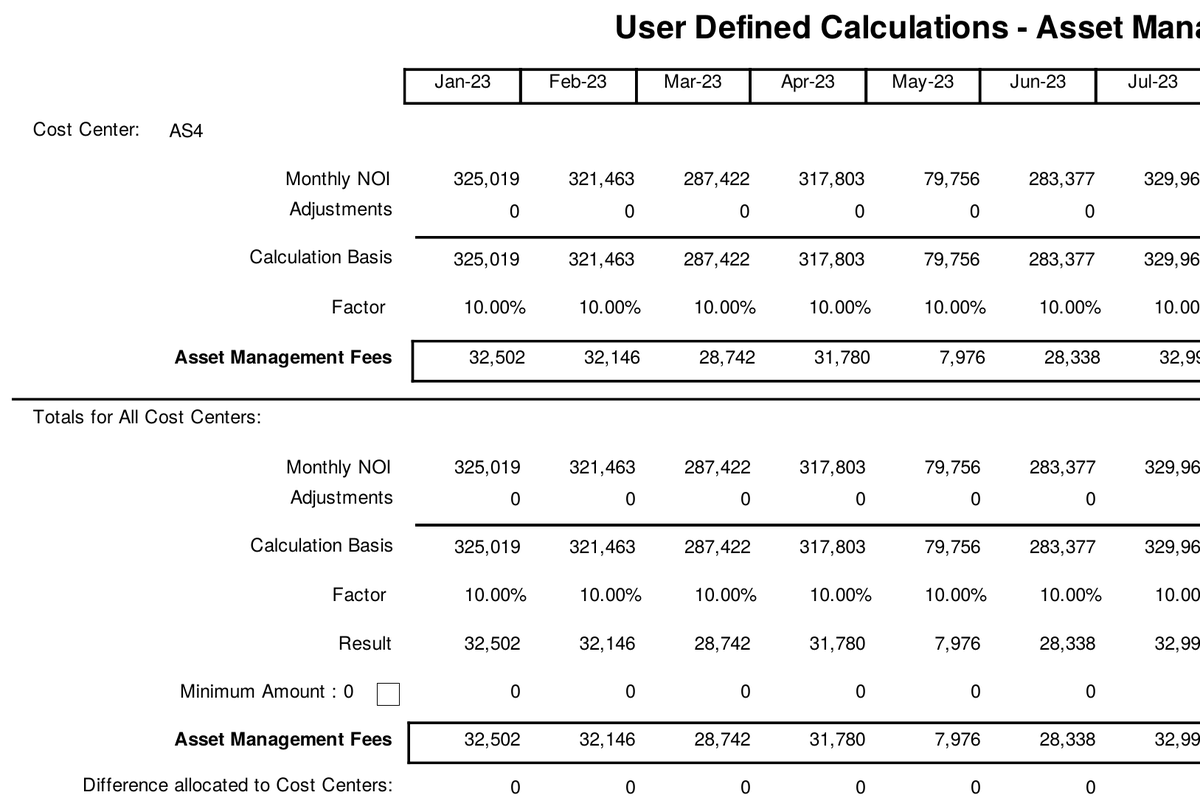
User Defined Calculations for asset management fees: monthly NOI, adjustments, calculation basis, rate, and resulting fee by cost center.
First page of the sample, cropped. Open the PDF for the whole report.

User-Defined Calculations

Property ManagersBudget seasonMonthly
When you run it
Budget season, for anything the standard formulas do not cover.
What it answers
Fees and adjustments you define yourself, such as an asset management fee as a percentage of NOI, calculated month by month and tied back to the accounts they post to.
Open the sample of User-Defined Calculations(PDF, 6 pages)

Portfolio Managers

Roll-ups across properties, for the figures an asset decision rests on.

Portfolio Monthly Detail: income and expense accounts for the combined portfolio with a column for each month and the annual total.
First page of the sample, cropped. Open the PDF for the whole report.

Portfolio Monthly Detail

Portfolio ManagersMonthlyBudget season
When you run it
Monthly, and during budget season to review the properties as a set.
What it answers
Every property’s budget rolled into one monthly view, which works because each property is on, or mapped to, the master chart of accounts.
Open the sample of Portfolio Monthly Detail(PDF, 8 pages)
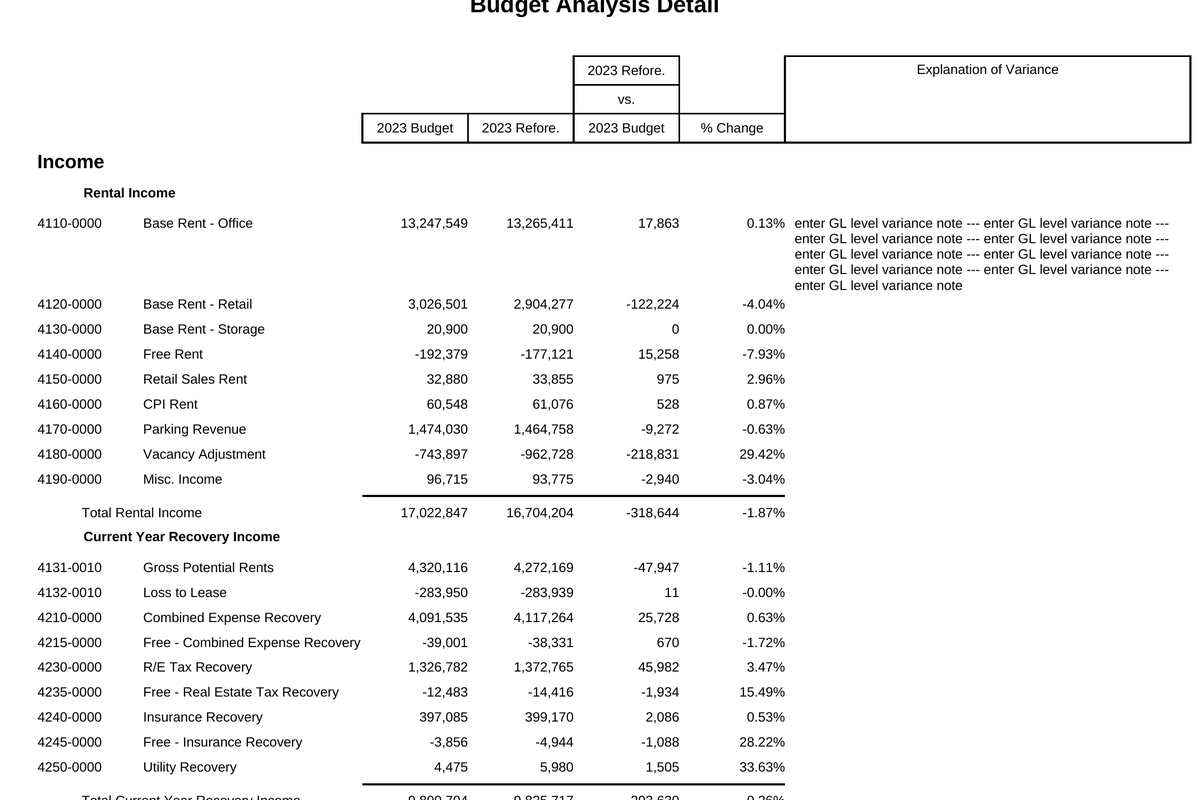
Portfolio Variance Detail: budget, reforecast, and actuals by account for the combined portfolio with percent change and explanation of variance.
First page of the sample, cropped. Open the PDF for the whole report.

Portfolio Variance

Portfolio ManagersMonthly
When you run it
Monthly after close.
What it answers
Two or three periods compared across the whole portfolio, with the explanation of variance alongside each account, so the asset manager reads one report instead of twelve.
Open the sample of Portfolio Variance(PDF, 8 pages)
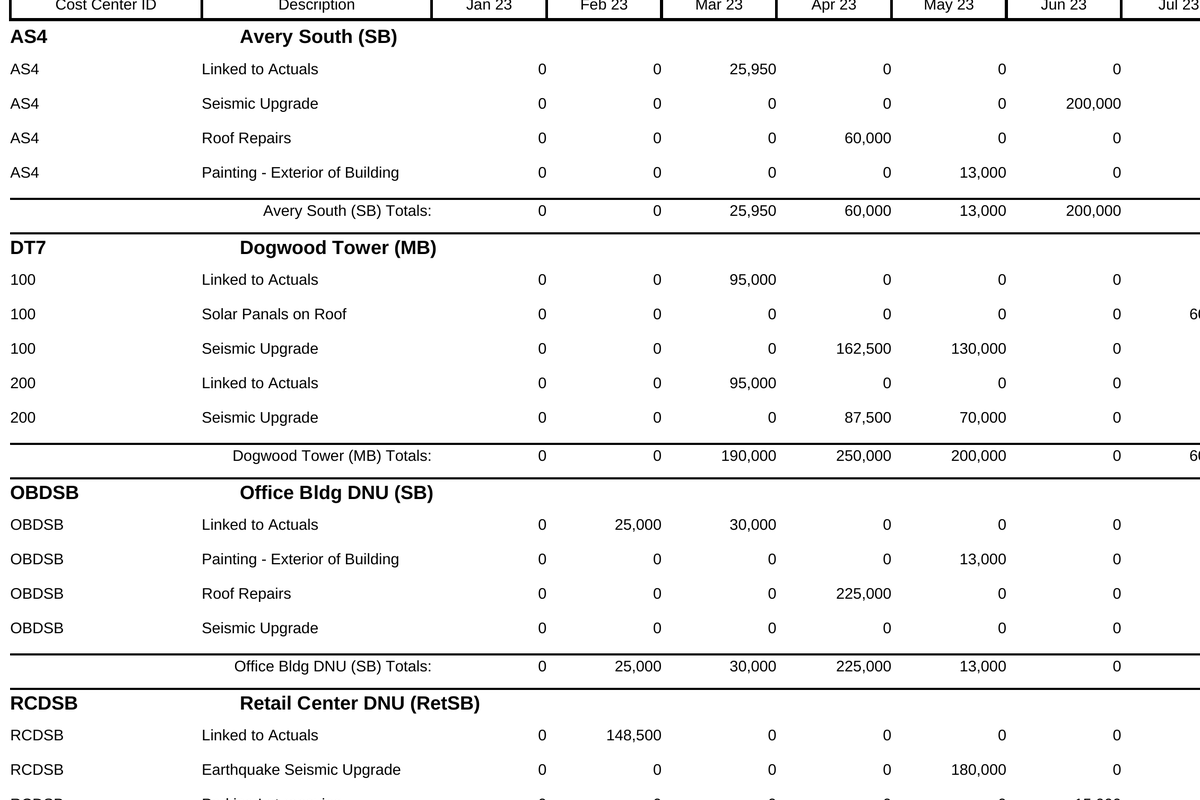
Portfolio Select GL Detail: for a chosen account, each property’s line-item descriptions and monthly amounts across the year.
First page of the sample, cropped. Open the PDF for the whole report.

Portfolio GL Schedule

Portfolio ManagersMonthlyBudget season
When you run it
Whenever one account across the portfolio needs explaining.
What it answers
The line items behind any single account for every property at once: pick the account, see who budgeted what, and why.
Open the sample of Portfolio GL Schedule(PDF, 3 pages)
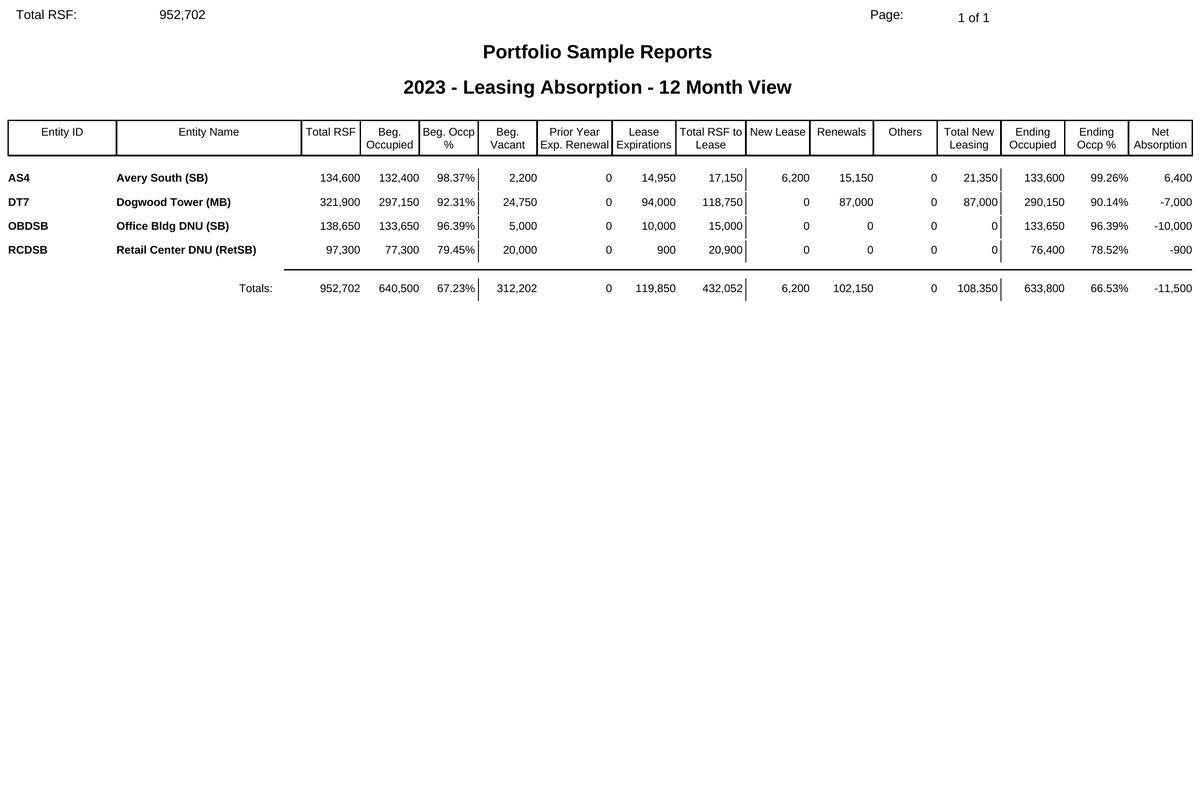
Portfolio Leasing Absorption, 12-month view: for each property, total square feet, occupied and vacant square feet, and absorption by month.
First page of the sample, cropped. Open the PDF for the whole report.

Portfolio Lease Absorption

Portfolio ManagersLeasing
When you run it
Leasing reviews and the budget-season occupancy assumption.
What it answers
How much space each property expects to lease up over the next twelve months, and what that does to occupancy.
Open the sample of Portfolio Lease Absorption(PDF, 1 page)
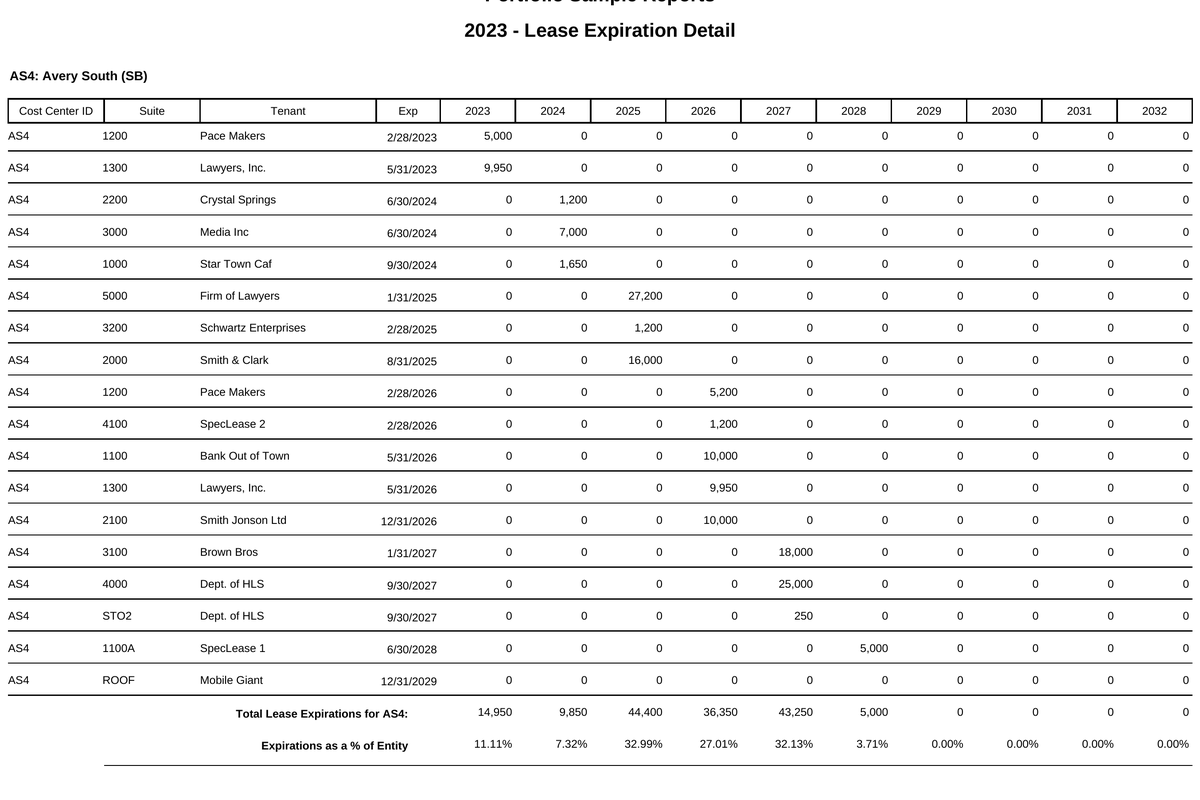
Portfolio Lease Expiration Detail: tenants grouped by property with suite, square feet, expiration date, and rent, and square feet expiring by year.
First page of the sample, cropped. Open the PDF for the whole report.

Portfolio Lease Expiration Detail

Portfolio ManagersLeasing
When you run it
Leasing reviews, and before any hold-or-sell discussion.
What it answers
Which leases expire when, across every property, with square feet and rent, so rollover risk is visible by year.
Open the sample of Portfolio Lease Expiration Detail(PDF, 5 pages)

Multi-Family

Unit-mix revenue: market rent, GPR, loss to lease, vacancy, occupancy.

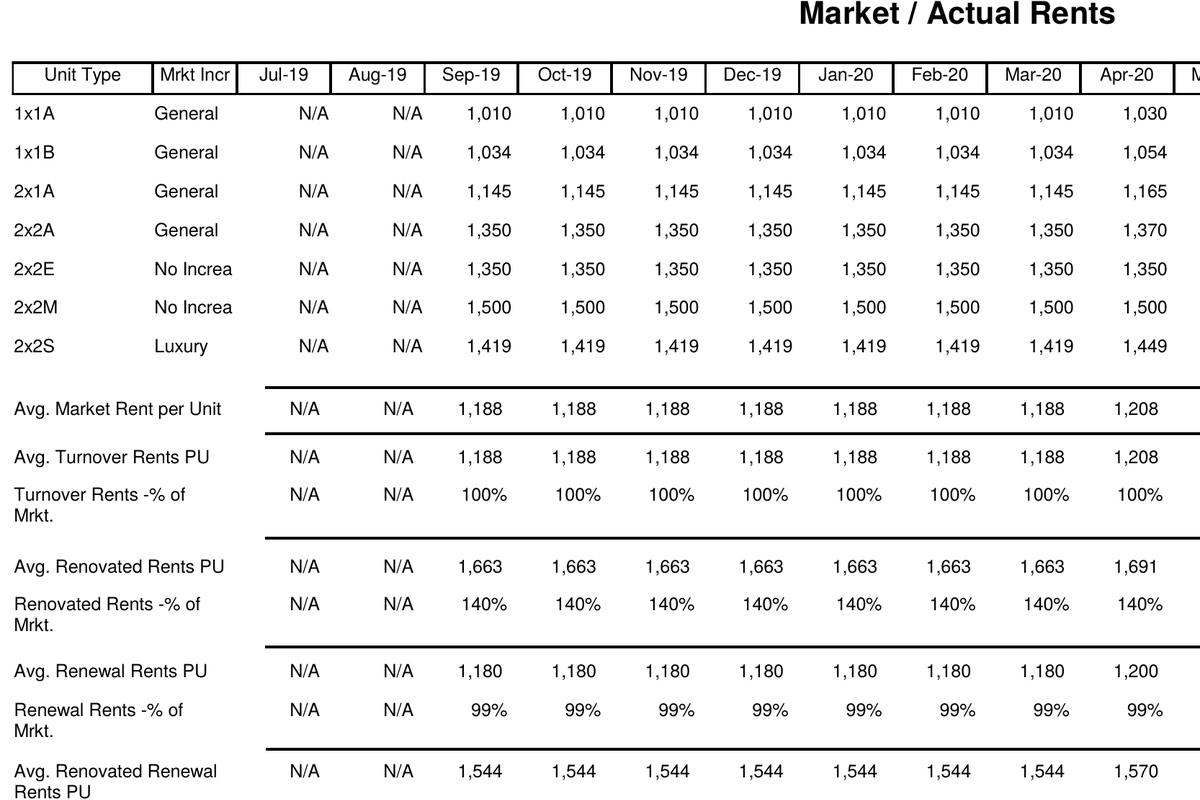
Market and Actual Rents by unit type: monthly market rent, average actual rent, and the spread between them for a multi-family property.
First page of the sample, cropped. Open the PDF for the whole report.

Market / Actual Rents

Multi-FamilyBudget seasonLeasing
When you run it
Budget season, when market rents are set by unit type.
What it answers
Market rent against actual rent for every unit type, month by month, so the gap that renewals and turnover can close is visible.
Open the sample of Market / Actual Rents(PDF, 1 page)
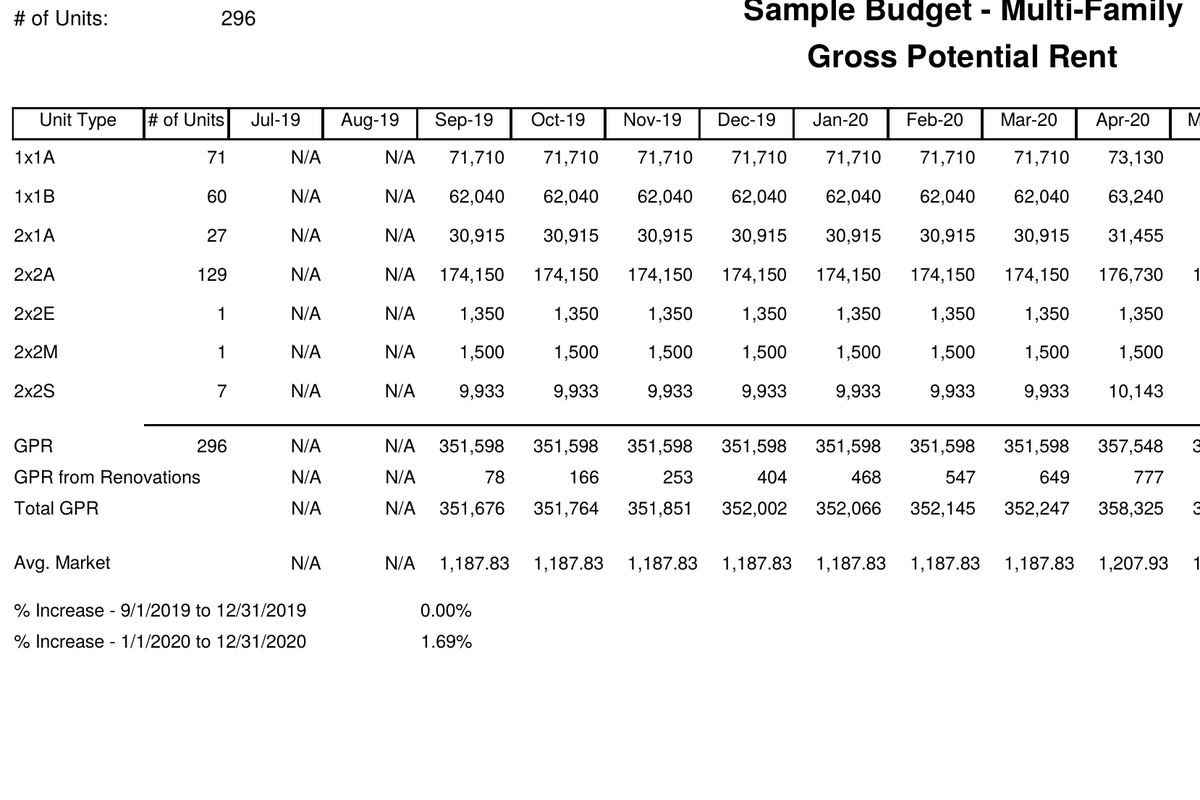
Gross Potential Rent by unit type: unit count, market rent, and monthly GPR across the budget year for a 296-unit property.
First page of the sample, cropped. Open the PDF for the whole report.

Gross Potential Rent

Multi-FamilyBudget season
When you run it
Budget season, as the top line of the multi-family revenue build.
What it answers
What the property would collect if every unit were rented at market, by unit type and month. Every deduction below starts from this number.
Open the sample of Gross Potential Rent(PDF, 1 page)
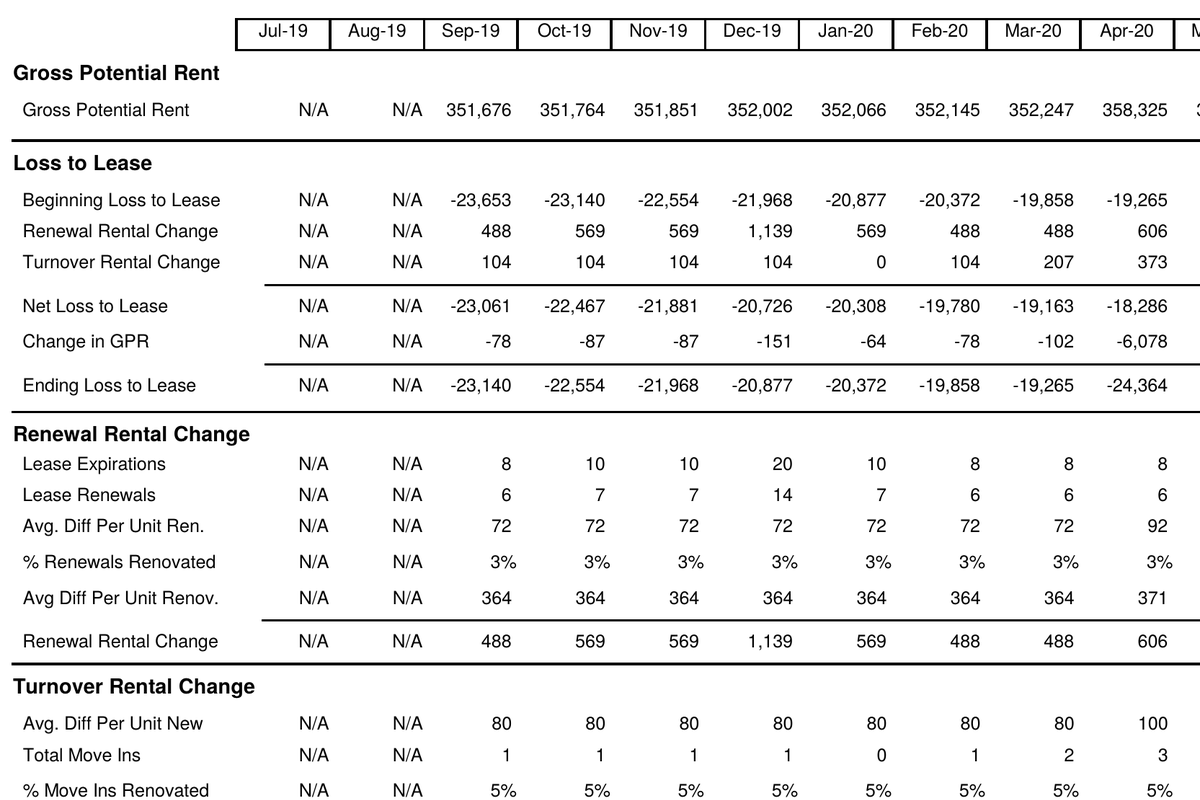
Loss to Lease: gross potential rent, beginning loss to lease, renewal and turnover rental change, and ending loss to lease by month.
First page of the sample, cropped. Open the PDF for the whole report.

Loss to Lease

Multi-FamilyBudget seasonMonthly
When you run it
Budget season and monthly reviews.
What it answers
How far actual rents sit below market, split into the pieces that cause it: renewals below market, turnover timing, and concessions.
Open the sample of Loss to Lease(PDF, 1 page)
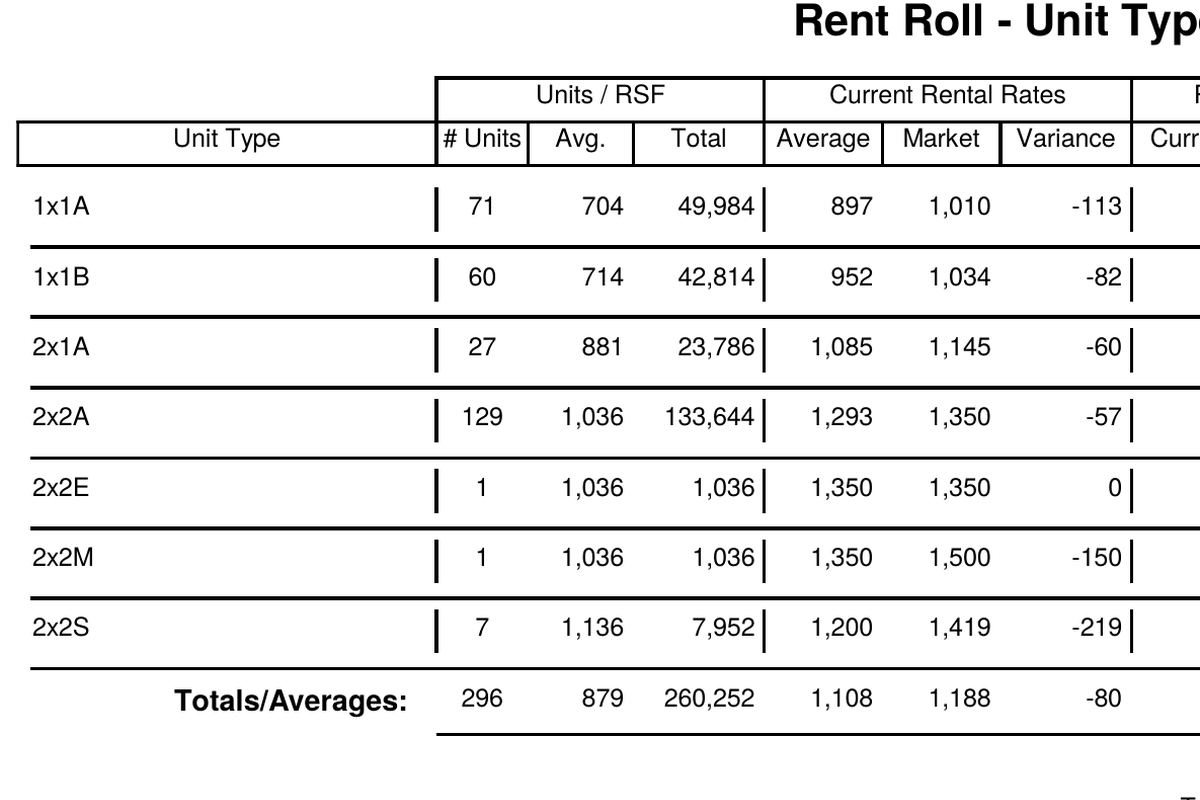
Multi-family Rent Roll by unit type: number of units, average and total square feet, current, market, and average rents, and variance per unit type.
First page of the sample, cropped. Open the PDF for the whole report.

Rent Roll by Unit Type

Multi-FamilyLeasingBudget season
When you run it
Any time, as the one-stop view of the units.
What it answers
Units, average size, current and market rent per unit type, and the variance between them, totalled for the property.
Open the sample of Rent Roll by Unit Type(PDF, 1 page)
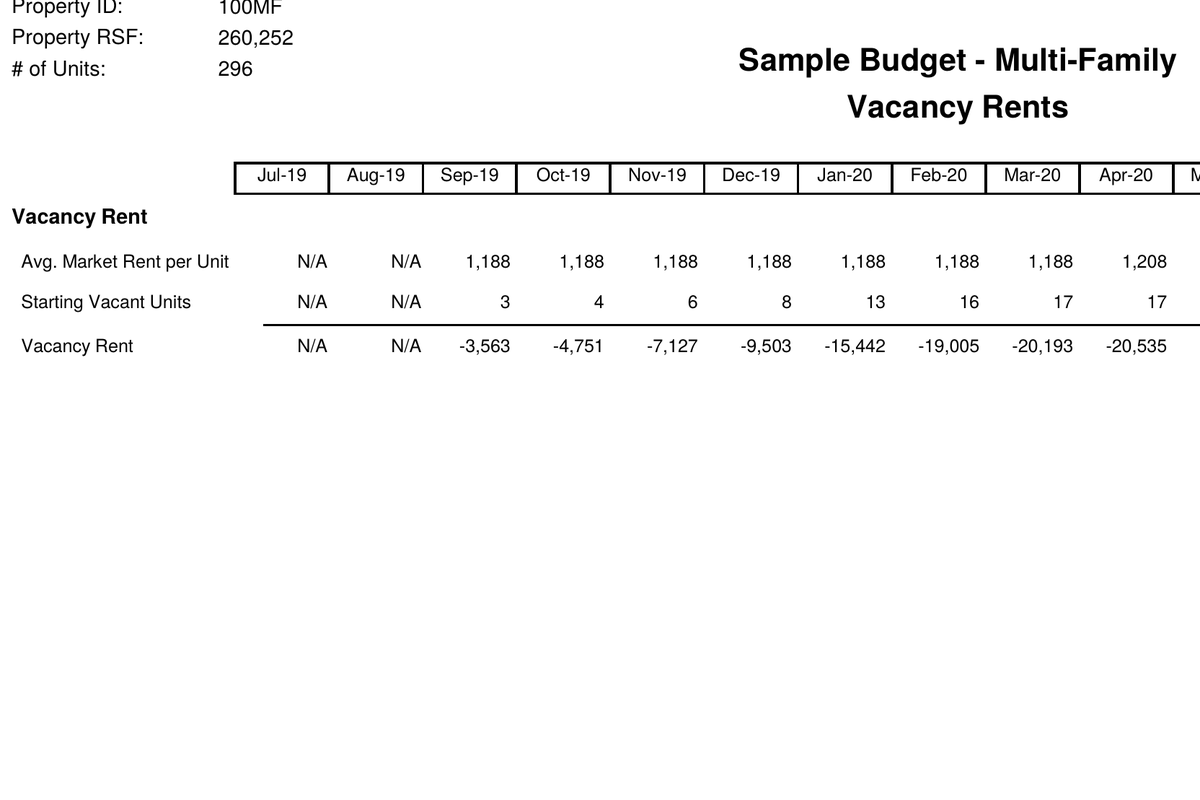
Vacancy Rents: average market rent per unit, starting vacant units, and monthly vacancy rent for a multi-family property.
First page of the sample, cropped. Open the PDF for the whole report.

Vacancy Rents

Multi-FamilyBudget seasonMonthly
When you run it
Budget season and monthly, alongside occupancy.
What it answers
The market rent on vacant units each month, which is the revenue the leasing plan is trying to recover.
Open the sample of Vacancy Rents(PDF, 1 page)
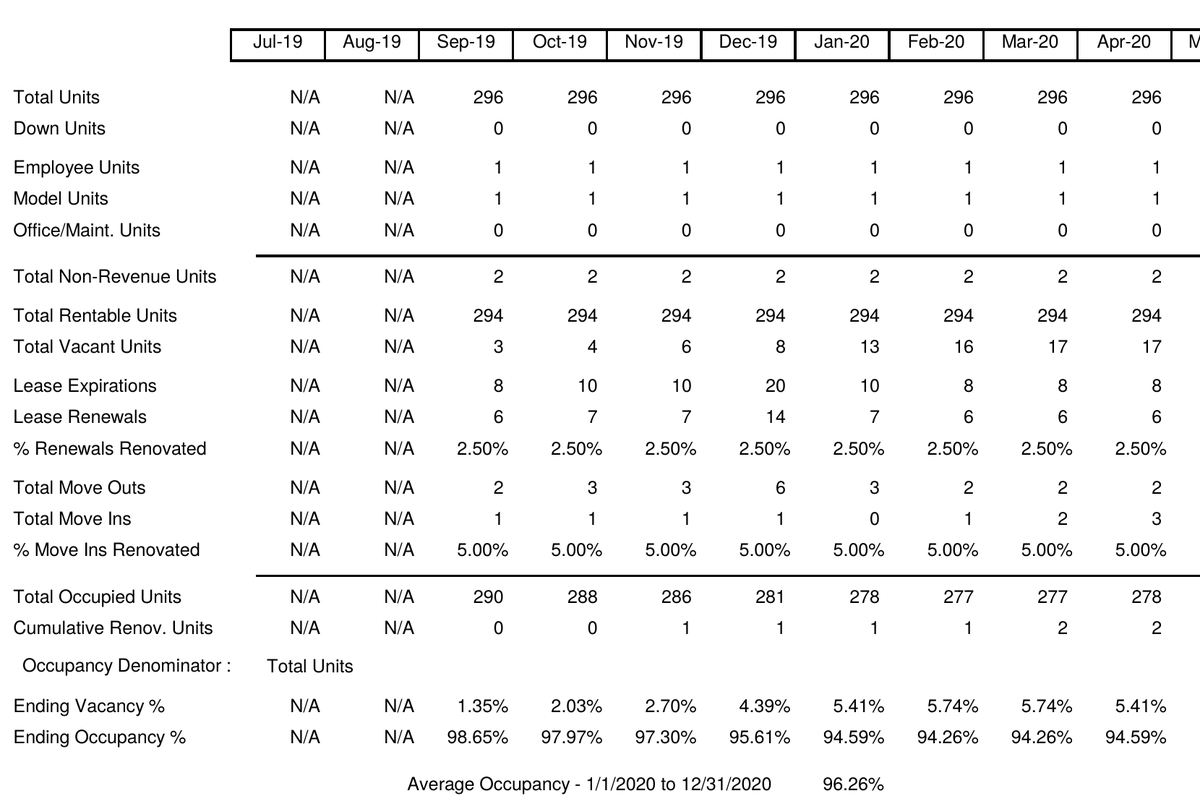
Occupancy Projections: total units, down and model units, move-ins, lease expirations and renewals, and ending occupancy percent by month.
First page of the sample, cropped. Open the PDF for the whole report.

Occupancy Projections

Multi-FamilyBudget seasonLeasing
When you run it
Budget season, and whenever the leasing plan changes.
What it answers
Projected occupancy and vacancy, month by month across the budget year and into the next, built from expirations, renewals, and move-ins.
Open the sample of Occupancy Projections(PDF, 1 page)
No report carries both of those tags. Show all 18.

See them with your own properties

A demo runs on your chart of accounts and your rent roll, so the reports you see are the ones you would run.